
Appearance
Date Builder Expressions
The Date Builder method allows a variable to contain a dynamic expression of a date. Dates are constructed by applying parameters to a date known to the workflow. These paramaters allow date variables to model the complexities of working days, holidays and the interplay of weekdays and calendar months.
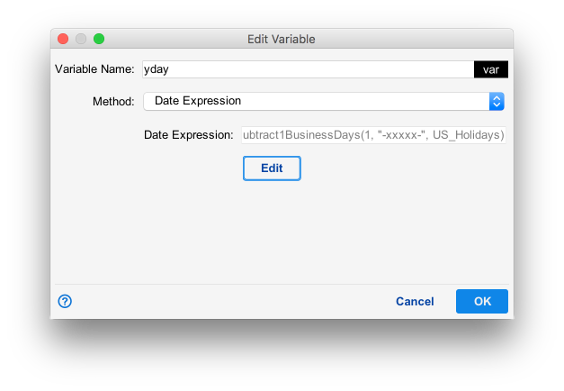
In the example above, the variable yday is set to a date expression. The date expression is then constructed in the date editor.
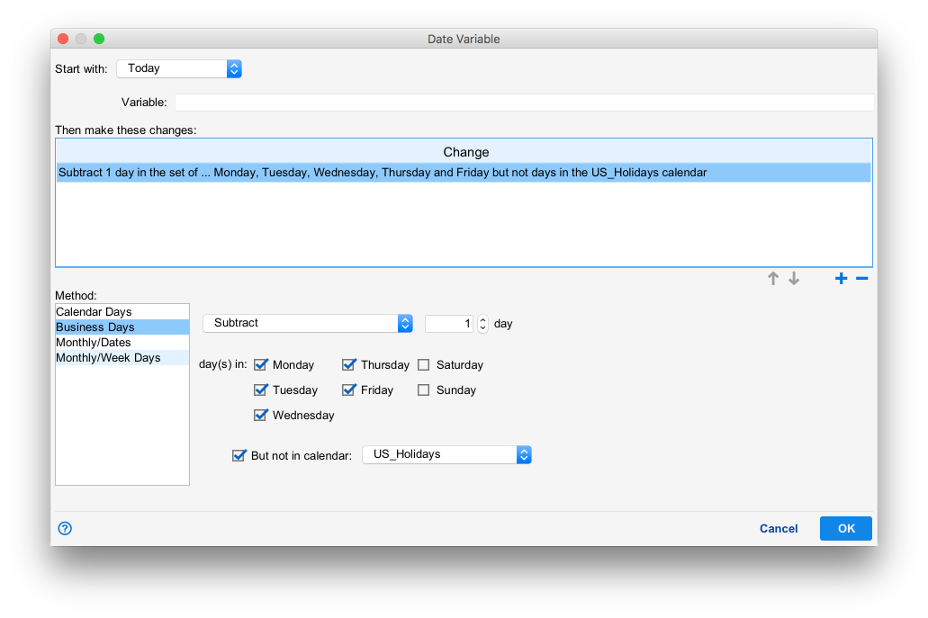
yday has been created with the baseline "Today", and has been modified with the "Business Days" method to skip Saturday and Sunday, skip days on the calendar "US_Holidays" and one day has been subtracted. This creates a date value such that the variable yday provides the most recent passed non-holiday business day.
Starting Date
The "Start with:" field can be set to one of:
- Today. Today at midnight
- Tomorrow. Tomorrow at midnight
- Yesterday. Yesterday at midnight
- Now. The current time
- Existing Variable. An existing variable specified in the "Variable:" field.
This date will then be used as the baseline for a logical expression.
Changes
The changes panel shows the methods available to modify a baseline date such as defining a specific time, shifting from the reference date, or the inclusion and exclusion of days in certain calendars.
Methods
Methods are individual logical statements used to modify the date.
Calendar Days
Calendar Days causes one or more days to be added to or subtracted from the staring date.
Business Days
Business Days functions similarly to calendar days in that it adds or subtracts one or more dates from the starting date. Hoewever, if the result lands on a day that is not defined as a business day it is skipped.
But not in calendar appends the selected business days with a calendar such that specific days of the year defined by the calendar are not considered business days. This allows business days to also skip specific dates like holidays.
Monthly/Dates
Monthly/Dates causes specific dates such as the first, last or any numeric day of the month to be selected from. When chosen, the number of days specified in the spinner is added or subtracted from the starting date. Then, the date is rounded to the next date matching the criteria specified.
Monthly/Week Days
Monthly/Week Days causes specific weekdays to be selected relative to their position in the month, allowing dates such as "the second Sunday of April". When chosen, the number of days specified in the spinner is added or subtracted from the starting date. Then, the date is rounded up or down to the nearest date matching the criteria specified.