
Appearance
Edges and Conditional Flow
Edges dictate the flow of the token from task to task. The most common edge is the basic edge, which controls flow based on the completion status of the preceding task. It has three possible conditions:
- Success. The preceding task succeeds.
- Failure. The preceding task fails.
- Complete. The preceding task succeeds or fails.
When a task completes, the condition of each outgoing edge is evaluated. The first edge whose condition is true becomes satisfied and routes the token to the next task.
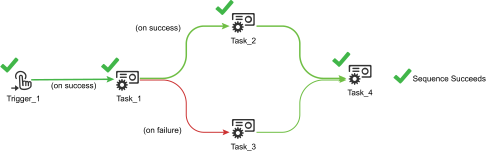
In the example above, Task_1 is connected to edges with both success and failure conditions. This allows the final status of Task_1 to determine whether Task_2 or Task_3 is executed next. Since Task_1 succeeds, the success condition is satisfied, and Task_2 is executed.
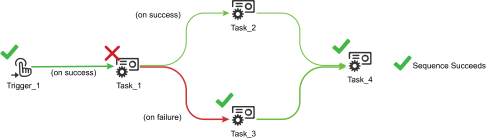
In this example, the same workflow is run but Task_1 fails. The failure condition is satisfied and Task_3 executes.
Changing Variables
Every type of edge is able to interact with the value of variables via Javascript expressions.
For more information about variables, see Variables.
For more information about Javascript in Situate, see Javascript.
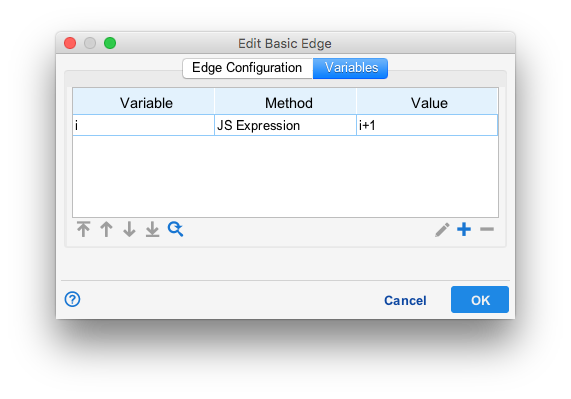
In the example above, a basic edge has been configured to add one to the value of the variable i when the token moves across it.
Expression Edges
Expression edges are another type of edge which evaluates a Javascript expression to control flow based on the value of one or more variables. When outgoing edges are evaluated, expression edges will only be satisfied when their Javascript expression evaluates to true.
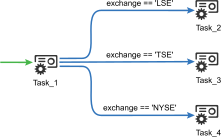
Here, expression edges select between multiple tasks based on the value of the variable exchange. This allows more complex behavior in workflows beyond the success or failure of a task.
Complex Flow with Variables
By combining variable interaction and expression edges, workflows can have selection as complex as any programming language.
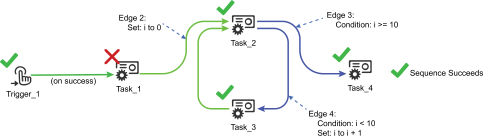
In this example, the variable i is used as a counter. When traveling the edge between Task_2 and Task_3, i is set to 0. After Task_2, when i is less than 10, the token moves to Task_3 and is increased by 1. Once i becomes greater than or equal to 10, the token moves to Task_4. This creates a loop that runs Task_2 and Task_3 10 times before Task_4 is run.