
Appearance
Endpoints
An endpoint is something Situate talks to that doesn't run a Situate agent, such as a database, an email server or a web service. Workflow tasks use endpoints to reach these systems.
Endpoints are managed under Endpoints in the Object Browser. Only members of the AssetManagers or Administrators group can create, edit or delete endpoints.
Creating an Endpoint
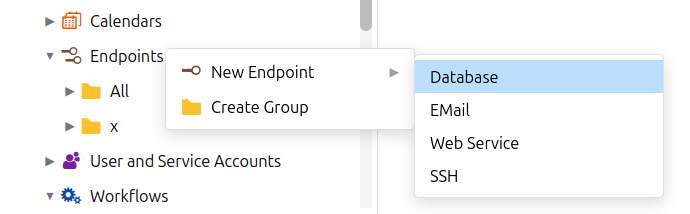
Right-click Endpoints (or the All folder, or an endpoint group) and select New Endpoint, then the kind of endpoint. If you start from an endpoint group, the new endpoint is also added to that group.
| Kind | Used for | Settings |
|---|---|---|
| Database | Running queries and updates on a database through JDBC | Database Endpoints |
| Sending and receiving email | Email Endpoints | |
| Web Service | Calling a REST or other HTTP service | Web Service Endpoints |
| SSH | Running a command, with the SSH task, on a computer that can't run an agent | The SSH Endpoint |
Common Settings
Every endpoint has these settings at the top of its Add/Edit Endpoint dialog:
| Setting | Meaning |
|---|---|
| Endpoint Name | A unique name for the endpoint |
| Description | Text to help identify the endpoint. Required |
| Access Through Asset | The asset whose agent makes the connections to the endpoint. Usually XonaServer, the Situate server. Database endpoints are always reached from the Situate server, so this field is disabled for them |
The rest of the dialog depends on the kind of endpoint. The dialog shows what's missing or wrong at the bottom, and Save stays disabled until the settings are complete.
Testing an Endpoint
Database, email and SSH endpoints have a Test button. Testing an SSH endpoint also reads the computer's host key and asks you to accept it; see Accepting the Host Key. Situate must save the settings before it can test them, so if you have unsaved changes, Situate asks whether it can save them first. After a successful test, Save changes to OK, which closes the dialog. If the test fails, the dialog shows "Last test operation failed".
Credentials
Some credentials are stored in the endpoint itself, such as a database login or the login for sending email. Others come from the user the workflow runs as, such as the login for reading email, a web service's API key, or the login and private key for an SSH endpoint. For those, each user or service account that uses the endpoint needs an Endpoint specific authentication identity for it. See Identities.
Managing Endpoints
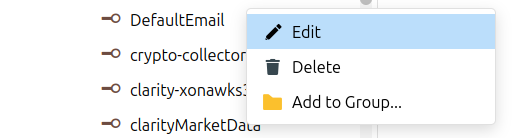
Right-click an endpoint to open its menu.
| Menu item | What it does |
|---|---|
| Edit | Opens the endpoint's settings |
| Delete | Deletes the endpoint |
| Add to Group... | Adds the endpoint to an endpoint group |
Endpoint Groups
Endpoint groups organize endpoints the same way asset groups organize assets: every endpoint is in the All folder, and can also be in any number of groups. Only Administrators can create top-level groups, by right-clicking Endpoints and selecting Create Group.
Right-click a group for New Endpoint, Edit Group, Create Group (a sub-group), Delete Group and Security (see ACLs and Security). Right-click an endpoint inside a group for Remove From Group.