
Appearance
Database Endpoints
A Database endpoint allows you to execute queries and updates on any database that supports a JDBC driver.
Creating or Editing a Database Endpoint
Right-click Endpoints and select New Endpoint > Database, or right-click an existing database endpoint and select Edit. See Endpoints.
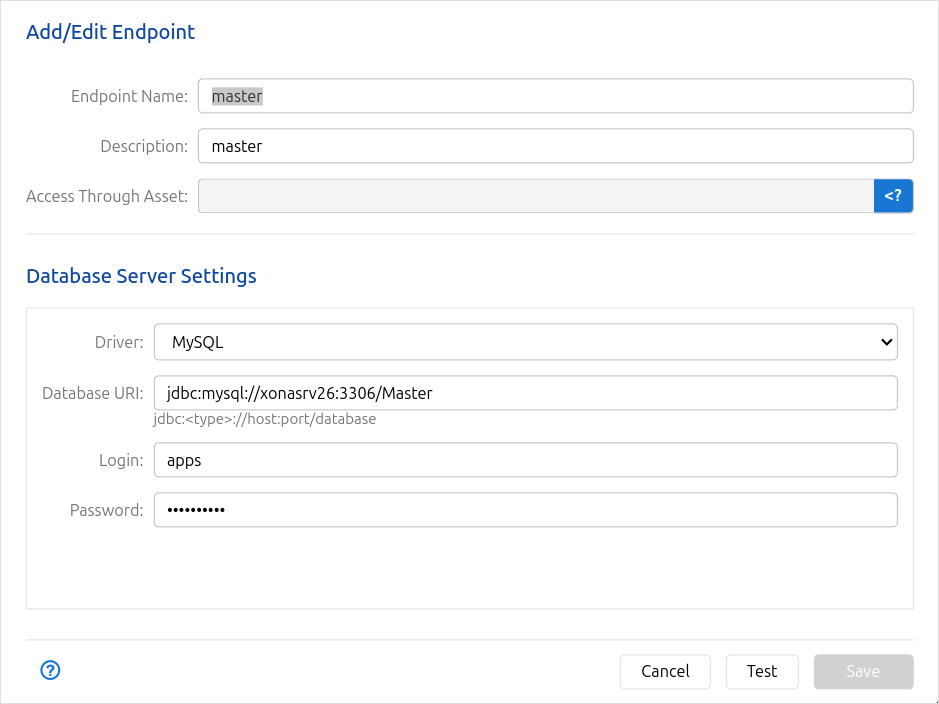
Settings
| Setting | Description |
|---|---|
| Endpoint Name | A unique name to identify this database endpoint within Situate. |
| Description | A helpful description of the endpoint. Required. |
| Access Through Asset | Not used. Situate always connects to databases from the Situate server. |
| Driver | The kind of database. See below. |
| Database URI | The JDBC URI of your database. The dialog shows the expected form for the selected driver (see below). |
| Login | The username to authenticate with the database. Required. |
| Password | The password to authenticate with the database. Required. |
| Driver | URI form |
|---|---|
| MySQL | jdbc:mysql://host:port/database |
| Microsoft JDBC Driver 8+ | jdbc:sqlserver://host:port;databaseName=dbname |
| jTDS Microsoft SQL | jdbc:jtds:sqlserver://host:port/database;domain=[domainname] |
| PostgresSQL | jdbc:postgresql://host:port/database |
| Microsoft Access Driver (UCanAccess) | jdbc:ucanaccess://path/to/file.mdb |
| Other Generic JDBC Driver | Whatever your driver expects |
For the MySQL, Microsoft and Postgres drivers, the dialog checks that the URI starts the right way.
Drivers
Situate uses JDBC (Java Database Connectivity) to connect to your database. Each vendor publishes a JDBC driver. In some cases open source drivers exist for certain databases that are not provided by the vendor. You will need to contact your database vendor or consult their documentation to find the correct driver. The driver should be compatible with Java version 1.8.
Drivers are installed in Domain Settings. See 3rd Party Drivers for more information.
Testing Settings
Click Test to check that Situate can connect to the database. Situate must save the settings before it can test them. See Testing an Endpoint.