
Appearance
Lifecycle of a Workflow
It's important to understand the lifecycle of a workflow and workflow instance before talking about specifics of the workflow queue view.
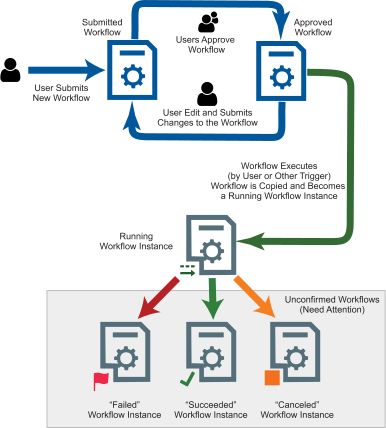
The diagram shows the lifecycle of a workflow.
A user first creates and submits a workflow. The workflow's state is submitted.
One or more users approve the submitted workflow making it an approved workflow. The approval process is discussed in Approving Workflows later in this book.
Assuming they have permission to do so, a user may edit an approved (or submitted -- arrow not shown) workflow and submit it for approval. When an approved workflow is edited and re-submitted, the approved workflow remains in place and will continue to run as programmed until a submitted workflow is approved causing the approved workflow to be replaced.
The Workflow Executes. A workflow executes when a trigger inside the workflow fires. A workflow may be started by a user via manual trigger inside the workflow (the manual trigger fires starting the workflow). When this happens, a new workflow instance is created and given a copy of the approved workflow at the time of execution. The workflow instance is placed into the running state.
A workflow instance either runs to completion (it succeeds or fails) or is canceled either by a user or another workflow task.
Once complete, the workflow enters the "Needs Attention" or Unconfirmed state.
Unconfirmed workflows remain in the workflow queue until they are confirmed. This either happens automatically via the workflow's settings or manually by a user.
Automatically Confirming Workflows
The idea behind confirmation is that a workflow should remain visible in the queue as long as it needs the attention of an operator. Removing it (or confirming it) should be a considered decision. There are times, however, when you want a workflow to automatically confirm with no action on the part of an operation such as when it succeeds.
In the workflow designer there are settings under the "Options" tab that control automatic confirmation.
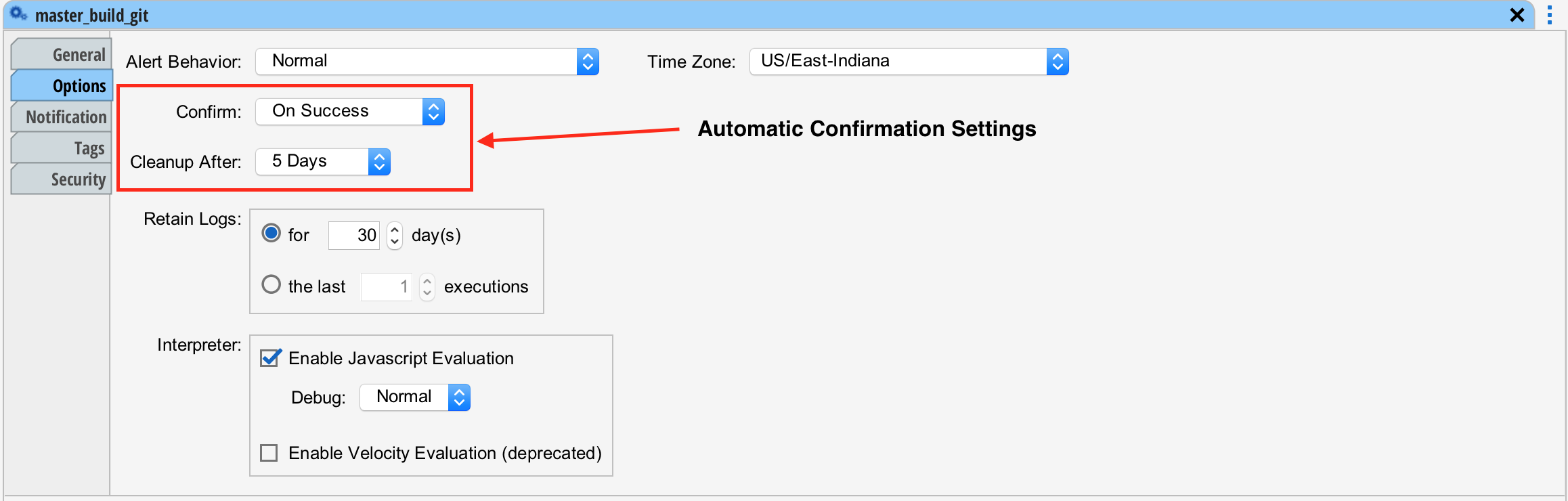
The "Confirm" setting is typically set to "On Success" This means if the workflow succeeds, automatically confirm it, removing it from the queue. The confirm actions are:
| On Success | Automatically confirm the workflow if it completes successfully. |
|---|---|
| Always | Always automatically confirm regardless of its completion status. |
| Never | Never automatically confirm. |
Cleanup
To prevent too many unconfirmed workflows from piling up in the queue, the "Cleanup" setting in the workflow designer causes unconfirmed workflow instances to be confirmed after some number of days.