
Appearance
Situate Domains
A domain is a distinct instance of Situate. Companies may have more than one domain. This is often the case when there are different business units that desire to have their own and/or some companies want to have both a dev and production instance.
The domain is located in the object browser at the top-level. In this example, the domain is named "acme".
Opening Domain Settings
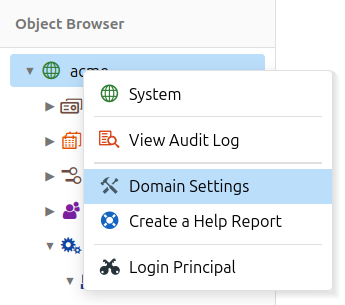
To open a domain's settings, right-click the domain at the top of the object browser and select Domain Settings. The settings open in a new tab.
WARNING
Only members of the Administrators group can change domain settings.
The settings are grouped into the screens listed down the left side of the tab:
| Screen | What it configures |
|---|---|
| Settings | Replication to a backup server, server logging, third-party drivers, restarting the server, and license and server information |
| Security | Authentication services and Situate groups |
| Sibling Domains | Other domains the UI opens when you open this one. Shown to Administrators only |
| AI Permissions | What the Claude task may and may not do in every workflow |