
Appearance
Splits, Joins and Parallel Execution
The split task facilitates parallel execution. When a token reaches a split the token stops. Each edge is evaluated, and a new token is created for each satisfied edge. The tokens are then advanced to the first task within each sequence.
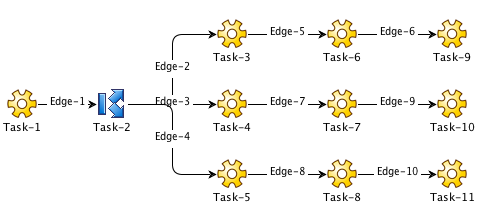
In this example, a token advances from Task-1 to Task-2. At Task-2, the token stops. Edges 2, 3, and 4 are evaluated and since they are basic edges configured with "on success" they are satisfied. A token is created and started at Task-3, Task-4 and Task-5. Each token then independently begins executing their respective sequence. When the tokens reach the end of their sequence, they are terminated. Once all the tokens created by the split are terminated, the initial token held at the split is terminated.
If all sequences are successful, Task-2 will be successful and the workflow will succeed. If any one of the sequences fail, Task-2 will fail, causing the workflow to fail.
The Join Task
A split is often paired with a join. A join is where the tokens created to execute parallel sequences meet, terminate and the initial token continues.
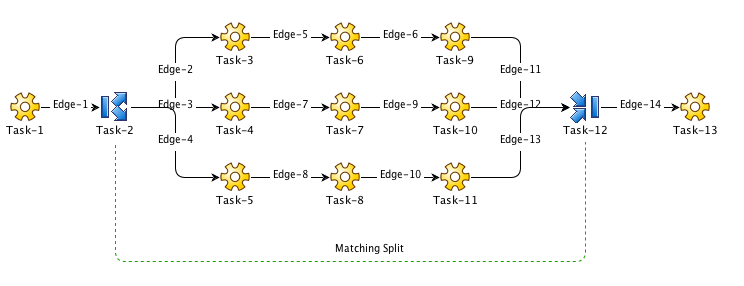
In this example, a token reaches Task-2 and stops. New tokens are created and start running at Task-3, Task-4 and Task-5. These tokens meet at the join, Task-12. Here, the new tokens are terminated. The initial token waiting at Task-2 is advanced to the join and then allowed to continue.
The success or failure of the join always mimics that of the split. If the split succeeds, so does the join and vice versa.
In the example, if each sequence completes successfully, Task-2 will be successful, and therefore Task-12 will be successful. The token waiting at Task-2 will then continue to Task-13.
The Matching Join
The dashed line indicates that Task-2 and Task-12 are matched. Workflows can often become very complex and there may or may not be a join for every split. It is therefore necessary to be able to set the matching split as a configuration property of the join.
Open Sequences
An open sequence is a sequence started by a split that has no final edge to a matching join. When a sequence is "open" its final state does not contribute to the success or failure of the surrounding split/join.
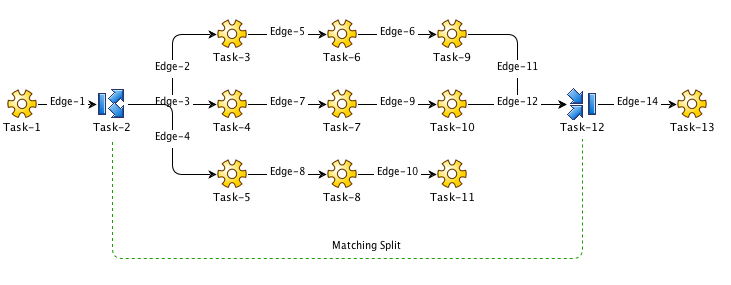
For example, in the workflow above, the sequence started by Task-5 is an open sequence because Task-11 does not have an edge to Task-12. So, if the sequence started by Task-5 fails (tasks 5, 8, or 11 fail), it has no effect on Task-2. Only the sequences starting at Task-3 and Task-4 contribute to the status of Task-2 and 12.
It is also possible to create a basic edge from Task-11 to Task-12 that is configured "on complete". This way, if Task-11 fails, Task-2 will still succeed. If however, either task-5 or 8 fails, Task-2 will fail.
Variables with Splits
Variables exist in a scope or set. When a variable is referenced, the current scope is searched and, if found, the variable is returned. If not, the parent scope is searched, and so on and so on until the top scope is reached.
When a token is created as part of a split, the token is given a new scope with the parent scope being that of the token waiting at the split.
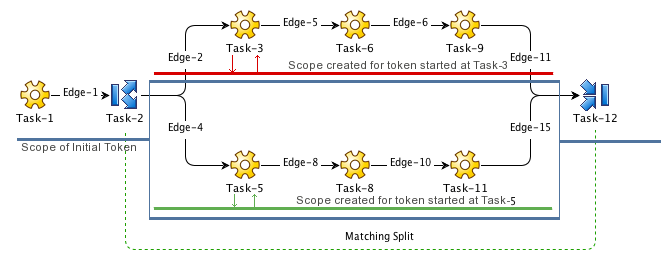
So, for example, a new scope is created for token started at Task-3 (red) whose parent scope is that of the token at Task-2 (blue). A new scope is also created for the token at Task-5 (green).
Because they are defined in parent scope (blue), variables defined before the split are are all visible to the tasks after it. However, any new variables defined in the sequence's new scope and are only accessible to that sequence.
For example, if a variable, A, was created and set by Task-1, it will be visible to Task-3 and Task-5, etc. But because a new scope is created for each sequence started by the split, variables defined by Task-3, are only visible to Task-6 and Task-9, and are not visible to Task-5, etc.
By creating a new scope for all tokens created by the split, we guarantee that any variables created during the processing of each sequence will be private to that sequence. Task-3 and Task-5 may both define a variable, X, but assign a different value. Therefore Task-6 sees a different value from Task-8, etc.
Configuring a Split
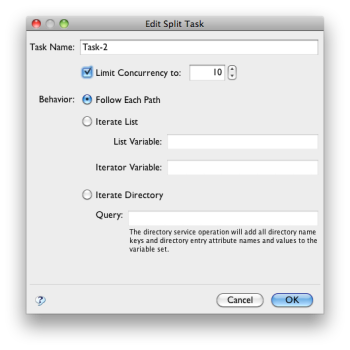
A split is a true split when it's behavior is set to "Follow Each Path". Otherwise, it is an iterator, which is discussed in the next section.
When using an iterator it is possible to set the concurrency or maximum number of tokens active at any time. This allows you to throttle back a split.
M-of-N Joins
The join does not necessarily have to wait for all sequences before it can continue.
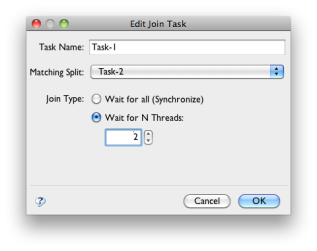
By default, a join is a synchronizing join, meaning that it waits for all tokens. It is also possible to make the join a N-of-M join by simply selecting the number of tokens you need to wait for before continuing.
When used as a N-of-M join, only those paths that reach the split are taken into consideration when deciding the final status of the split.
Discriminating Joins
A discriminating join is a join that only waits for the first sequence before continuing. A discriminating join is supported by setting the number of threads to wait for to "1".