
Appearance
Alert Trigger
The alert trigger is used to start a workflow based upon a monitoring event.
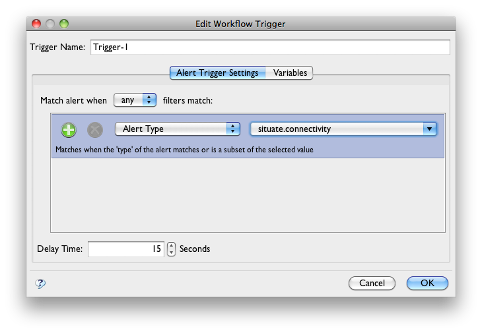
The Alert Filter
The upper section of the alert trigger contains an alert filter. You can add one or more filters to match the set of alerts you want to match. The "Match alert when" allows you to set an "and" or "or" relationship among the filters.
You can also set a filter to be a filter group. In this case one or more "sub" filters are collected under a single filter allowing you to create an "and" or "or" behavior.
delay
The delay time is the time in seconds before the trigger is fired. This gives intermitent alerts time to clear before action is taken.
The Variables Tab
Like all triggers, the file trigger can inject one or more variables. This covered in "Triggers and Data Injection".
Automatically Injected Variables
The alert trigger will, itself, inject information into the workflow that it executes. As with any variable these can be accessed by all tasks within the workflow. This covered in more detail in the section: "Introduction to Variables".
The following variables can be used throughout a workflow in any task or entry that accepts a directive when the alert trigger fires.
- alert : com.xona.situate.alert : The state of the Alert
The com.xona.situate.alert object implements the interface shown below. Any of those methods can be called on the alert variable reference.
public interface AlertInterface extends Serializable {
public String getAsset();

public String getGuid();
public int getGeneration();
public boolean isEvent();
public int getLevel();
public int getErrorCode();
public long getTime();
public String getId();

public Object [] getArgs();

public String getExceptionMesg();
public String getExceptionTrace();

public String getCreatedAboutStr();
public String getCreatedByStr();
public Attributes getAttributes();

public Acl getAcl();
}