
Appearance
Auto-Upgrade
Situate agents can be directed to upgrade themselves. There are two steps to this process.
The Repository
Situate maintains a repository on the Situate server that contains the installation packages for each version and kind of Situate you have installed. This repository is managed by the Repository Manager.
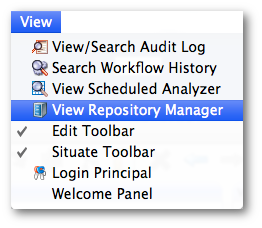
The Repository Manager may be opened by selecting the View / Repository Menu item.
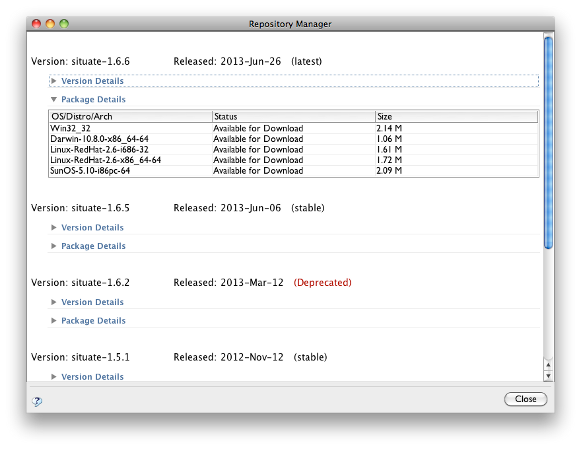
The repository manager shows each version available from XonaSoftware's website. Under each version, there is a "Version Details" button that will expand to show the detailed release notes for the version. There is also a "Package Details" that shows you the list of available packages and if you have them installed or not.
Before you can upgrade you must get the packages you need from the repository. This easily done by expanding the "Package Details" section of the version you want, right clicking on the table and selecting "Download Package" or "Download All Packages". The packages will be retrieved. A MD5 checksum will be computed and tested against the known value to validate the package.
Performing the Upgrade
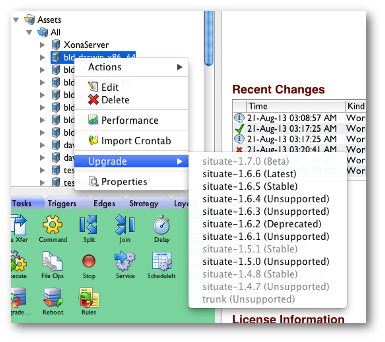
Once the packages are staged in the repository, the upgrade process is simple. Right-click on an asset or asset group to select the "Upgrade >" sub menu. Then, choose which version you want and the upgrade process will begin.